by Sandy McCauley | Jan 18, 2023 | SCAL, Sure Cuts A Lot, Uncategorized

So much for a Top 10 list. I couldn’t omit any of my favorite new SCAL6 features and it was challenging enough to select just 13 from the 30+ new changes from SCAL5 to SCAL6. So, off we go for my personal countdown:
#13 More Room for Designing
No longer are you restricted to only using the right and bottom areas outside of the page. Scroll out and utilize much more room for designing your projects:

#12 Monogram Maker
The new Monogram Effect allows you to design a monogram of up to 3 letters using any font you have installed. Other features include:
The option to create an unframed monogram or choose from over two dozen frames and modify their size, thickness, and color
Choose from various letter arrangements, based on single, double or triple letter monograms
Customize the text size, letter size, font choice, color, and tracking

#11 Offset/Inset in the Trace Window
For those who routinely trace imported clipart, followed by adding either an inset cutline or an outer contour, this will save you a few extra steps:

#10 Support for Siser Romeo and Juliet Cutters
If you’re in the market for a new cutter, be sure to check out the Siser 12” Juliet and 24” Romeo models. They have the same amazing camera technology found in the Skycut and StarCraft SOLO, high-definition cutting, and terrific support. While SCAL6 is an additional 3rd Party software, you will find plenty of SCAL6 experts already using Siser cutters and eager to help you with your questions.

#9, #8, #7 Pattern Fill Options
These allow you to fill shapes with customizable geometric patterns. Variations of these pattern fill are offered in the following functions:
Effects>Ray –

Effects>Line Fill –
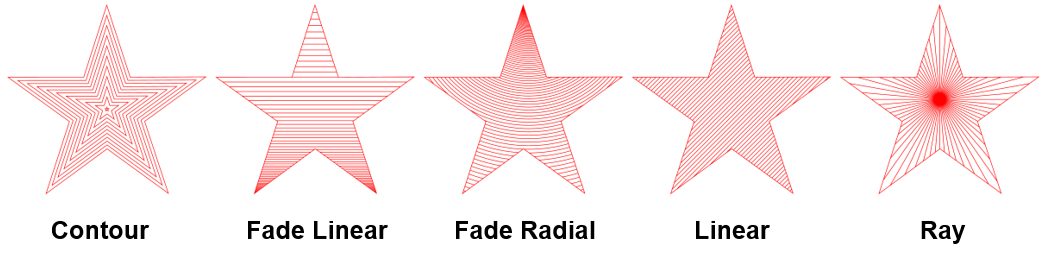
Effects>Rhinestones –

#6 Rhinestone Scatter
Speaking of rhinestones, SCAL6 has a new effect called Rhinestone Scatter which adds a random but customizable spray of rhinestones based on 3 optional outline shapes surrounding a design:

#5 Corner Rounding
Round Corners will round off sharp corners on a selected shape. The most common situation is when a design has right angle corners and the user would prefer those corners to be rounded:

An added benefit is when tearing occurs while cutting shapes with extra sharp points, such as 7+ pointed stars or blades of grass. Applying even the smallest amount of rounding can provide greatly improved cutting.
#4 Data Source Copies
Data Source Copies is a powerful new feature which generates duplicates of your original design but customizes each one by changing selected elements in that design. Some typical applications include:
Address labels
Name tags
Escort cards
Student ID cards (and other school applications)
Planner stickers
Product serial number labels

You provide the replacement data with imported CSV files. You can also set up dates and/or numbers to automatically increment.
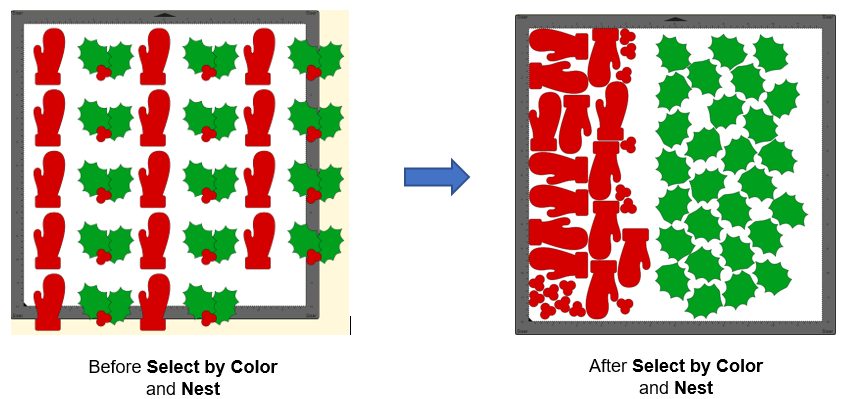
#3 Select by Color
At long last, you can now select all shapes with a particular Fill color or a particular Stroke color. This provides a much easier method for owners of the regular SCAL version to do cut-by-color applications, as well as nest shapes of the same color to save on material usage.
#2 Flatten
(but not the Cricut type)
A new Flatten function is essentially identical to the Back Minus Front function, but with two advantages: 1. It can be used with multiple shapes at once. 2. The shape(s) on top are retained. Thus, the Flatten function’s purpose is to remove the overlap from any shape beneath any other shape or shapes. This will be of great use to those doing HTV applications.

#1 Separate Score Force
For those making stickers where you want to kiss cut an inner path, followed by fully cutting an outside path, the Score option on the Style Panel now allows you to assign layers to Score and, in the Cut Settings window, assign a different force from the one used for full cutting. This feature can also be used when cutting difficult materials, like chipboard, in which better results are achieved if the first pass or two are made at a lower force and a final pass or two are made at the higher one.

And these are certainly not the only additions to SCAL6. There are over 30 changes in total shown in this document:
How Does SCAL6 Differ from SCAL5?
What are ALL the extra functions in SCAL6 Pro?
SCAL6 Pro versus Regular SCAL6
Download SCAL6:
15 Day Trial
Purchase options:
SCAL6
SCAL6 Pro
Already own a version of SCAL? Check out the upgrade pricing options:
Upgrade to SCAL6 Regular
Upgrade to SCAL6Pro
And for those supporting SkatKatz, the very best company in Australia:
SCAL6 – Australian Pricing
by Sandy McCauley | Apr 3, 2017 | Events and Retreats, Retreats, Uncategorized

The next KNK Retreat will be held May 26 – 28, 2017 in Edmonton, Alberta, Canada! Liz Ackerman, who has taught at prior KNK Retreats and seminars will be hosting this one and I recommend her highly! She’s energetic, experienced, smart and fun to be around! For more information, visit the page linked below and feel free to post any questions you might have.
2017 Wild Rose Retreat
by Sandy McCauley | Mar 20, 2017 | KNK Force, Reviews, Uncategorized

Recently I was asked to review the KNK Force for an online site called Personal Die Cutting. If you are interested in learning more about this incredible one-of-kind machine, check out the review here.
A detailed comparison to other KNK cutters is presented in the comparison tables here at my site.
To check out the resources available for the KNK Force, visit a dedicated support page I set up, as well as Cutterpunk’s support page.
Many KNK Force owners have created some absolutely amazing things! If you are a Facebook user, visit the photos section of the KNK Force Facebook Group
To see KNK Force pricing and available accessories, click on the following links:
KNK Force digital die cutter
KNK Force accessories
KNK Force blades
Finally, if you have any questions about the KNK Force, please feel free to post them here or you can contact KNK USA directly by calling 800-268-3672 or you can use their contact ticket system at this link.
Happy Cutting!
by Sandy McCauley | Aug 7, 2016 | Events and Retreats, Retreats, Uncategorized

Come join us in Big Rapids, Michigan on October 7th, 8th, and 9th, 2016 for our KNK fall retreat. Michele Harvey, from Team KNK will be our instructor as we learn, explore, and get inspired with our KNK Cutters and Make The Cut software. Michele is a talented instructor/presenter for KNK and comes with years of experience in the field. We will have an added bonus for those of us with the new KNK Force. Darrel Farris will be attending the retreat and has offered to share some tips and/or activities that I know will be a big benefit to all. Darrel is such an asset to Team KNK and has so much to share!
The Retreat Includes:
✩ 4 great meals
✩ 6 – 7 classes
✩ Demonstrations
✩ Make-n-Takes
✩ Free goodies
✩ One-on-one assistance
✩ Class notes and files
✩ Cutting materials
Cost and Accommodations
The cost for the Anchored in Inspiration KNK Retreat, including all of the above, is $295.00 per person. Participants are responsible for travel expenses and room cost at the Holiday Inn and Conference Center in Big Rapids, MI. The discounted room cost for the retreat participants is $119.00 plus tax. If you’d like to reduce your cost by sharing a room, let us know and we may be able to help you find a roommate. When you call to reserve a room, be sure to let them know you are participating in the KNK Retreat so that you get this group rate.
DEADLINE TO RESERVE A ROOM: Sept 7, 2016
Holiday Inn Hotel & Conference Center
1005 Perry Avenue
Big Rapids, MI
Phone: (231)796-4400
Schedule
The conference room will open at 3:00 PM with the first class starting at 4:00PM. Dinner will be served, followed by classes, demonstrations, and an evening workshop. Saturday will be filled to the brim with classes, demonstrations, challenges, games, lunch, dinner, and an evening workshop. On Sunday, we will have one more class, followed by a light meal, some final Q & A, and parting gifts. The event will conclude at 1:00PM.
Participation in all classes and demonstrations is optional, so you can head out any time to enjoy the local attractions. We encourage you to bring your cutter, but it’s not a requirement to join us as we will have extras and will seat everyone for sharing as needed.
If you would like to have a guest join us for a meal, please include the request in your application. We will provide actual pricing after we have a final count. This retreat is available for 25 attendees, and we will have a waiting list in case of cancellations.
***Reserve Your Spot***
1) Complete the online registration here. Please complete all of the questions – each retreat is customized to the responses you provide. If you prefer, you can email Laurie at theredcabinstudio@gmail.com to let us know you wish to attend. We will send you a short application form to complete, scan, and return. If you do not receive a response within 24 hours, please contact Laurie.
2) Send $125 deposit by check, money order, or PayPal to Laurie Nash. If you use PayPal, please enter theredcabinstudio@gmail.com and the amount.
THE DEADLINE FOR MAKING A DEPOSIT IS September 7, 2016. The $170 balance will be due Sept 23, 2016.
by Sandy McCauley | May 16, 2016 | Events and Retreats, Retreats, Uncategorized

Come join Michele Harvey from Team KNK, and learn to master your Klic-N-Kut and Make the Cut software!
The cost of the retreat is $395 which includes:
✩ 4 great meals
✩ 6 – 7 classes
✩ Demonstrations
✩ Make-n-Takes
✩ free goodies
✩ one-on-one assistance
✩ class notes and files
✩ cutting materials
Favorite projects from Team KNK will also be presented!
Your hotel and travel expenses are separate. Rooms are $89 a night, plus tax. When you call to reserve a room, be sure to mention “Cuttin’ With KNK” to get this group rate.
DEADLINE TO RESERVE A ROOM: June 22, 2016
Springhill Suites by Marriott DFW East/Las Colinas/Irving
(972) 580-1120
5800 High Point Dr.
Irving, Texas 75038
Hotel Amenities:
✩ free breakfast buffet
✩ fully equipped fitness center
✩ on site parking
✩ heated indoor pool
✩ whirlpool
Conveniently located near DFW Airport with free shuttle service to and from the East airport entrance.
The Lonestar lll room will open at 3:00 PM with the first class starting at 4:00PM. Dinner will be served, followed by classes, demonstrations, and an evening workshop. Saturday will be chock full of classes, demonstrations, challenges, games, lunch, dinner, and an evening workshop. On Sunday, we will have one more class, followed by brunch and some final Q & A and parting gifts. The event will conclude at 1:00PM.
Participation in all classes and demonstrations is optional, so you can head out any time to enjoy the local attractions. We encourage you to bring your cutter, but it’s not a requirement to join us as we will have extras and will seat everyone for sharing as needed.
If you would like to have a guest join us for a meal, please include the request in your application. We will provide actual pricing after we have a final count. This retreat is available for 25 attendees, and we will have a waiting list in case of cancellations.
***Reserve Your Spot***
1) Complete the online registration here. Please complete all of the questions – each retreat is customized to the responses you provide. If you prefer, you can email Michele at cuttinwithknk@gmail.com to let us know you wish to attend. We will send you a short application form to complete, scan, and return. If you do not receive a response within 24 hours, please contact Michele.
2) Send $195 deposit by check, money order, or PayPal to Michele Harvey. If you use PayPal, please use href=”mailto:cuttinwithknk@gmail.com”>cuttinwithknk@gmail.com.
THE DEADLINE FOR MAKING A DEPOSIT IS June 22, 2016. The $200 balance will be due July 8, 2016.
See Y’all in Texas!
by Sandy McCauley | Aug 10, 2015 | Copics, Retreats, Uncategorized

If you love Copic coloring or if you have invested in some Copic markers but are not using them to their fullest potential, then think about attending the Copic Boot Camp presented annually in Arizona. I can’t praise them enough!
Jennifer Dove has become a Copic guru! She’s published in several of the Copic coloring guides and is featured in the Annie’s Attic Copic videos. The wealth of information she shares at her retreats overshadows the Copic certification classes and workshops I’ve also attended.
Here’s a link to find out more about the upcoming retreat: Copic Boot Camp
This is a weekend you’ll never forget! I will be there and I hope you will be, as well!


